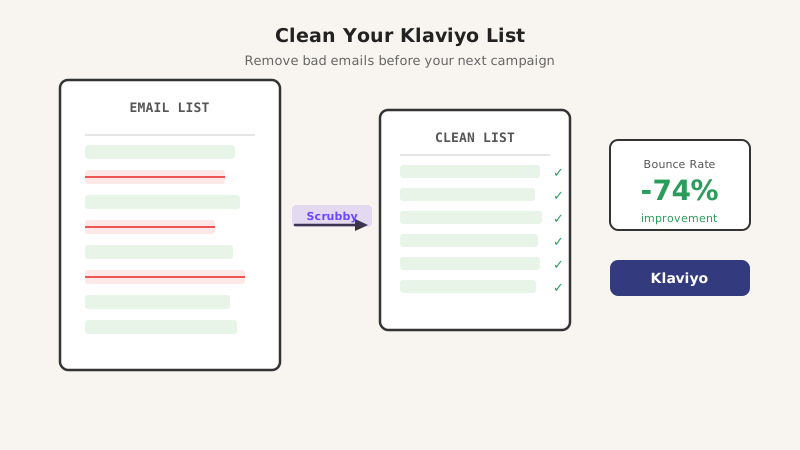
If your Klaviyo campaigns are landing in spam or your bounce rate keeps climbing, a dirty email list is almost certainly the cause. Klaviyo monitors sender health closely, and a bounce rate above 2% can trigger automatic sending restrictions that hurt your entire domain.
The good news: cleaning your Klaviyo list before every major send is straightforward when you have the right validation tool. This guide walks through why list hygiene matters in Klaviyo specifically, and how to clean your list in under an hour.
Why Klaviyo Is Strict About Bounces
Klaviyo shares infrastructure across thousands of senders, so it protects deliverability for everyone by enforcing bounce thresholds. When your bounce rate spikes:
- Klaviyo can throttle or pause your sending account
- Your domain reputation drops with inbox providers like Gmail and Outlook
- Future campaigns see lower open rates even after the account is restored
This makes proactive list cleaning essential, not optional.
What Makes an Email Address “Bad”
Not all invalid addresses look obviously broken. Common problem categories include:
Hard bounces are permanent failures: the email address does not exist, the domain is dead, or the mailbox was deleted. Every hard bounce you send to damages your reputation directly.
Catch-all addresses are the tricky ones. Many company domains are configured to accept every email sent to them, even addresses like [email protected]. These show as valid during basic verification but often end up bouncing or going unread when you send. Standard validators miss these. Scrubby specializes in catch-all detection, which is why it catches the risky contacts that tools like ZeroBounce and NeverBounce let through.
Role-based addresses like info@, support@, or admin@ are shared inboxes. They tend to have low engagement and high complaint rates because no individual person is reading them.
Disposable addresses are throwaway inboxes people use to grab a free lead magnet and never return.
Step 1: Export Your Klaviyo List
In Klaviyo, go to Lists and Segments, open the list or segment you want to send to, and click Export. Download the CSV with at minimum the email address column.
If you have a large master list, segment it by engagement first (for example, contacts who have not opened an email in 90 days) and validate that segment specifically. Unengaged contacts are where most bad addresses accumulate.
Step 2: Validate with Scrubby
Scrubby is built specifically for catch-all and risky email detection, the category that generic validators consistently miss.
- Log in and click Upload List
- Import your exported Klaviyo CSV
- Map the email column and start the validation job
- Download the results when complete
Scrubby returns each address with a status: valid, risky, invalid, or unknown. For most Klaviyo campaigns, you should suppress the invalid addresses immediately and make a judgment call on risky ones depending on how warm the audience is.
A typical Scrubby run on a 10,000-contact list takes a few minutes and will usually flag 5 to 20 percent of addresses as risky or invalid.
Step 3: Suppress Bad Addresses in Klaviyo
Once you have your clean and flagged lists from Scrubby:
- Create a new CSV containing only the invalid and risky email addresses
- In Klaviyo, go to Lists and Segments and select your suppression list (or create one called “Scrubby Suppressed”)
- Upload the bad-address CSV and import it as suppressed contacts
- Klaviyo will automatically exclude these from all future sends
Do not simply delete contacts from Klaviyo. Adding them to suppression means they stay out even if they re-enter through a signup form or integration, until you explicitly un-suppress them.
Step 4: Re-import Your Clean Contacts
For any list you rebuilt or segmented, re-import the clean addresses back into Klaviyo and update the list accordingly. Your next campaign send will go only to verified, deliverable inboxes.
How Often Should You Clean Your Klaviyo List?
A few guidelines that work well in practice:
- Before any campaign to a cold or older list: Always validate before sending to contacts you have not mailed in 90 or more days
- Quarterly for active lists: Even engaged subscribers churn as people change jobs or abandon email accounts
- After any significant list growth spike: If you ran a contest, gated a piece of content, or acquired a co-reg list, validate before adding contacts to your main sending list
The cost of validation is a fraction of the cost of account suspension, domain reputation recovery, or lost revenue from deliverability problems.
The Catch-All Problem in Klaviyo
This is worth emphasizing: if your Klaviyo list contains a lot of business email addresses (B2B audiences, conference attendees, downloaded contact lists), catch-all validation is non-negotiable.
Standard tools check whether the email format is valid and whether the domain has mail servers. They stop there. Catch-all domains return “yes, valid” to every lookup, so those tools pass them through. Scrubby runs additional probes to determine whether the specific mailbox is likely to accept delivery, which is the only way to surface catch-all risk before it hits your bounce rate.
If you are running outbound sequences through a tool like Kali alongside your Klaviyo nurture campaigns, cleaning your list once with Scrubby covers both channels and protects your sending domain across the board.
What to Expect After Cleaning
After your first serious list clean, most Klaviyo senders see:
- Bounce rate drop from 5-15% down to under 1%
- Open rate increase of 10-25% (smaller denominator of real inboxes, same number of opens)
- Improved inbox placement as domain reputation recovers
- Reduced risk of Klaviyo account suspension
The improvement compounds over time because a cleaner list generates better engagement signals, which further improves deliverability with Gmail, Outlook, and other providers.
Summary
Klaviyo’s deliverability enforcement is strict by design, and a single campaign to a dirty list can set your sender reputation back months. The fix is straightforward: export your list, validate it with Scrubby to catch hard bounces and catch-all addresses, suppress the bad contacts in Klaviyo, and send only to verified inboxes.
Clean lists send better. Better sends build better sender reputations. And better reputations mean more of your future campaigns reach the inbox instead of spam.

Kristel K.
Content Strategist