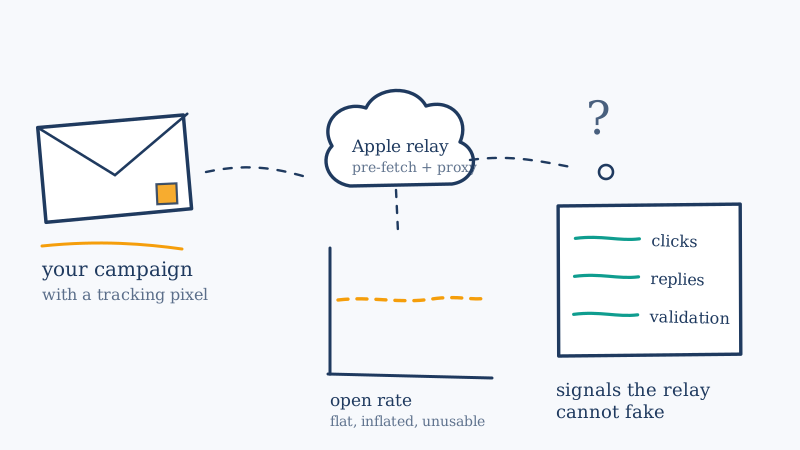
Open rate was never a great metric. It was a convenient one. It appeared at the top of every campaign report, it moved when you changed a subject line, and it gave teams something to point at when someone asked whether the list was still any good.
Then Apple shipped Mail Privacy Protection with iOS 15 in September 2021, turned it on by default behind a one-tap prompt, and most senders watched their open rates climb. Not fall. Climb. Five years later, a surprising number of marketing teams are still running sunset policies, lead scores, and list health reviews off a number that a privacy relay is partly generating on their behalf.
This article covers what Mail Privacy Protection actually does to the tracking pixel, why the resulting distortion runs in the direction nobody expects, which metrics survive it intact, and what to use instead when the question you really wanted to answer was “is this list still deliverable?”
What Mail Privacy Protection Actually Does
Open tracking has always worked the same way. Your sending platform embeds a tiny transparent image in the message, uniquely keyed to the recipient. When a mail client renders the message, it requests that image from your platform’s server, and the request is logged as an open. The request carries an IP address and a user agent, which is where geolocation and device reporting in your dashboard come from.
Mail Privacy Protection sits in the middle of that request. When it is active, Apple Mail routes image loads through a proxy operated by Apple, and it does so after pre-fetching the content. Three consequences follow, and they stack:
The IP address you log belongs to Apple, not the recipient. Location data and device fingerprinting go with it. The “opened in New York on an iPhone” line in your report becomes a line about Apple’s infrastructure.
The pixel request happens whether or not a human reads the message. This is the part that matters most and gets explained least. Pre-fetching means content is pulled when the message arrives at the device, not when someone taps it. Your platform logs an open at delivery time for a message that may sit unread forever, or get swiped into the trash from the notification screen.
It applies to the Apple Mail app, not to Apple email addresses. This is the second common misreading. A recipient using the Apple Mail app to read a Gmail, Outlook, or corporate Microsoft 365 mailbox is covered. A recipient with an icloud.com address who reads it in the Gmail web app is not. You cannot segment your way around this by filtering on the recipient domain, because the domain is not what determines the behaviour.
Put those together and you get the counterintuitive result. The privacy feature that was supposed to stop you from knowing whether someone opened your email does not report fewer opens. It reports more, and it reports them for the wrong reason.
The Direction of the Distortion
Most teams model this incorrectly in their heads. They assume privacy protection means missing data, so they expect open rate to drop and they treat whatever remains as real. The actual pattern is close to the opposite:
- Open rate inflates. Apple-side pre-fetches register as opens on top of your genuine human opens. Depending on how much of your list reads mail in the Apple Mail app, this can be a very large share of your reported opens.
- Click-to-open ratio collapses. Clicks stay roughly where they were, because a relay does not click links. Opens go up. The ratio between them craters, and it craters for reasons that have nothing to do with your copy.
- Open rate stops responding to your changes. A chunk of your reported opens is now a function of deliverability and device mix rather than subject line quality. Lift gets diluted and A/B tests need far more volume to show anything real.
- Dormant contacts can look engaged. This is the expensive one. A mailbox nobody has read in two years, still syncing on a retired iPad in a drawer, can keep generating opens. Your engagement score sees a live contact. Your sunset policy never fires.
That last point is why this is a list hygiene article and not just a reporting article. A metric that is merely noisy is annoying. A metric that systematically marks dead addresses as alive is actively dangerous, because it is feeding the exact decisions that protect your sender reputation.
The Three Jobs Open Rate Was Doing
Before replacing a metric, it is worth separating the jobs it was doing, because each one needs a different replacement.
Job 1: Creative feedback
“Did this subject line work?” Open rate was the primary read on subject lines and send times.
Replacement: measure one step further down the funnel. Click rate, reply rate, and conversion rate per send are all unaffected by the relay. They are smaller numbers, so you need more volume per variant for a result to mean anything, and you should expect to run fewer, bolder tests instead of many small ones. If you want to keep an open-based read for creative only, restrict it to a stable segment and compare variants against each other within the same send, never against a historical baseline from before 2021.
Job 2: Engagement scoring and sunset policies
“Should we keep mailing this person?” Open rate drove re-engagement flows, lead scores, and the decision to stop sending.
Replacement: rebuild the policy on actions that require a human. Clicks, replies, form submissions, logins, purchases, and support tickets. Then add an explicit recency rule that does not depend on engagement at all, because a contact who has not taken a single human action in twelve months should be sunsetted whether or not something is pre-fetching their pixels. Our breakdown of why lists go stale and what decay actually looks like covers the timelines to build that rule around.
Job 3: List health proxy
“Is this list still any good?” When open rates slid, teams concluded the list was aging and scheduled a clean.
Replacement: stop inferring list quality from behaviour and measure the addresses directly. This is the job open rate was always worst at, even before the relay existed, because an open tells you almost nothing about whether the other 90% of the list is deliverable. The honest answer comes from validating the addresses, not from watching aggregate curves.
What Survives the Relay
A quick reference for rebuilding your reporting. Signals in the first group are safe to make decisions on. Signals in the second group should be treated as commentary.
| Signal | Survives Mail Privacy Protection | Why |
|---|---|---|
| Hard bounces and SMTP rejections | Yes | Determined at the SMTP transaction, before any client renders anything |
| Click rate | Yes | Requires a deliberate human action |
| Reply rate | Yes | Requires a deliberate human action |
| Unsubscribes and one-click list-unsubscribe | Yes | Human action, and a required compliance signal regardless |
| Spam complaint rate | Yes | Reported by the receiver, not inferred from your pixel |
| Conversions and revenue per send | Yes | Measured on your own property |
| Open rate | No | Inflated by pre-fetch, and partly generated by a proxy |
| Open location and device | No | Reflects Apple infrastructure, not the recipient |
| Time-to-open and best-send-time models | No | The timestamp reflects delivery, not reading |
| Open-based engagement scores | No | Can mark dormant mailboxes as active |
The pattern is simple enough to hold in your head. Anything a human has to do, and anything a receiving mail server tells you at the SMTP layer, still works. Anything derived from a rendered image does not.
The Blind Spot That Stacks With It
Here is where this gets worse for B2B teams specifically, and where most MPP write-ups stop short.
The table above says hard bounces survive, and they do. Bounce data is the sturdiest list health signal you have left. But bounce data has its own hole, and it is a big one: catch-all domains. A catch-all mail server accepts every message sent to the domain, including mail for addresses that do not exist. There is no rejection, so there is no bounce, so your “bounces are low, the list is fine” conclusion is being drawn from a segment that is structurally incapable of bouncing. Standard SMTP verification tools cannot resolve these either, which is why they return them as “Risky”, “Accept-All”, or “Catch-All” rather than valid or invalid. If the category is new to you, Scrubby’s guide to catch-all emails explains the mechanics, and our walkthrough of where SMTP verification fails covers why the handshake cannot answer the question.
Now stack the two blind spots. Mail Privacy Protection removed your ability to infer engagement from opens. Catch-all domains remove your ability to infer validity from bounces. For a B2B list sitting mostly on corporate Google Workspace and Microsoft 365 tenants, that is a meaningful share of your file about which you now have neither a behavioural signal nor a delivery signal. Those contacts are not neutral in your reporting. They are quietly counted as healthy.
Resolving that segment is exactly the gap Scrubby was built for. Rather than relying on an SMTP handshake that a catch-all server will answer “yes” to regardless, Scrubby performs inbox-level testing over a 48 to 72 hour window and returns a definitive valid or invalid verdict. In practice that is run as a second pass: take the Risky or Accept-All segment your existing verifier handed back, upload it, and get the grey area resolved. Teams recover up to 42% more usable leads from lists they had already written off, at 98% deliverability on what comes back valid.
The practical split is worth knowing when you plan a clean. Quick Verification costs 1 credit per email and handles the standard checks. Deep Verification costs 3 credits per email and is the one that runs the full 72 hour inbox-level window on genuinely ambiguous addresses. If the list you want to audit is your CRM rather than a campaign export, CRM cleaning is the path for that, and the integrations list covers wiring results back into HubSpot, Salesforce, Pipedrive, Instantly, and SmartLead so the verdicts land where your sequences read them.
Rebuilding Your Measurement in Practice
A concrete sequence you can run this quarter.
Step 1: stop reporting open rate as a headline number. Move it below the fold in your dashboard, or remove it. As long as it sits at the top of the report, someone will make a decision on it. If your platform lets you label it, label it as inflated.
Step 2: estimate how exposed you are. Compare your click-to-open ratio now against a pre-September-2021 baseline if you still have one. A large unexplained drop with stable clicks is the relay, not your copy. Some platforms report an Apple Mail Privacy Protection segment or a machine-open flag directly, which is better than estimating. Either way you are looking for a rough share, not a precise figure.
Step 3: rewrite the sunset policy. Replace every open-based condition with a click, reply, or conversion condition, and add a hard recency cutoff that fires on its own. Write down the new rule somewhere a person can read it, because the old one is going to be in three automations you have forgotten about.
Step 4: validate the file instead of inferring from it. Run the whole list through your standard verifier, pull the Risky and Accept-All segment, and resolve that segment properly. This is the step that replaces “open rates are drifting down, time for a clean” with an actual count of deliverable addresses. Scrubby gives you 200 free credits to size the problem before you commit, and the pricing page lays out the per-credit cost if you would rather not take a subscription.
Step 5: watch the signals that are still honest. Spam complaint rate against the Gmail and Yahoo thresholds, bounce rate, and unsubscribe rate are your real early warning system now. Our guide to keeping complaint rate under the published thresholds covers where the lines are, and the suppression list guide covers keeping the people you should not be mailing out of your sends in the first place.
Step 6: close the loop on bounces. Make sure soft and hard bounces are being classified and suppressed correctly rather than retried indefinitely, since bounce handling is now carrying more diagnostic weight than it used to. The soft bounce versus hard bounce breakdown covers what each code is telling you.
The Takeaway
Mail Privacy Protection did not take a metric away from you. It left the metric sitting in your dashboard, looking healthier than before, and quietly severed its connection to reality. That is a worse failure mode than an outright gap, because nothing in your reporting flags it.
The fix is not a clever workaround to recover open tracking. There is not one, and attempting to build one puts you on the wrong side of a privacy feature your recipients deliberately opted into. The fix is to demote a proxy metric and promote the direct ones: human actions for engagement, SMTP responses for deliverability, and real validation for the catch-all segment where neither of those can reach. That is a smaller set of numbers than you had in 2021, and every one of them means what it says.

Amit S.
Marketing Lead