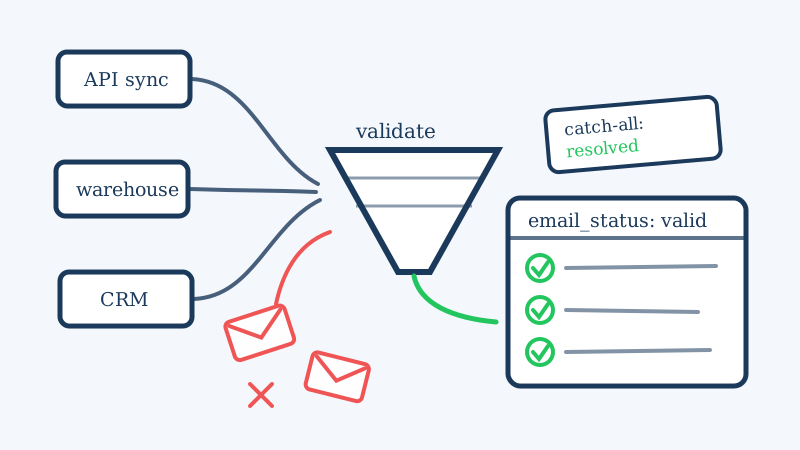
Customer.io sits in a different place than a classic newsletter tool. It is an event-driven messaging platform, which means your people records arrive through API calls, server-side identify events, reverse ETL syncs, and product signup flows rather than a single opt-in form. That flexibility is exactly why engineering-led teams pick it, and it is also why Customer.io workspaces accumulate bad email addresses faster than almost any other platform.
There is a second reason to care here that does not apply to most ESPs: Customer.io prices on profiles. Every dead address you sync in occupies a billable slot, pushes you toward the next pricing tier, and then bounces when a campaign finally reaches it. You pay to store the bad data, then you pay again in reputation damage. This guide covers the bounce thresholds that matter inside Customer.io, why event-driven data pipelines break list hygiene, and the exact cleaning workflow to run before your next broadcast.
Why Bounces Hit Harder in Customer.io
Customer.io is built around automation that runs continuously. A newsletter sends once and stops. A Customer.io campaign keeps firing for months as people cross trigger conditions, which changes the shape of the risk.
- Bounces accumulate silently. A broadcast shows you a bounce rate in one report. A lifecycle campaign spreads the same bad addresses across weeks of sends, so the damage registers as a slow reputation slide rather than one obvious spike.
- Hard bounces are suppressed automatically. Customer.io adds hard-bounced addresses to your suppression list so they are not mailed again. That protects you going forward, but it also means the profile stays in your workspace as a billable, unreachable record.
- Transactional and marketing share a reputation. Teams commonly run password resets, receipts, and onboarding drips from the same workspace and sending domain. A dirty marketing import can degrade the inbox placement of the transactional mail your product depends on.
- Account review is real. Customer.io’s deliverability team monitors bounce and complaint rates across the platform. Sustained bounce rates above the low single digits trigger outreach, remediation requirements, and in bad cases sending restrictions.
The working target most deliverability teams use is a bounce rate under 2 percent, with hard bounces well under 1 percent. Mailbox providers at Gmail, Outlook, and Yahoo read a higher rate as a sender mailing an unmaintained list, which is the standard fingerprint of spam.
Where Bad Addresses Enter a Customer.io Workspace
Fix the inflow before you fix the list, otherwise you will be cleaning the same workspace every quarter.
Server-side identify calls. If your application calls identify on every signup without validating the email first, typos and fake addresses land in Customer.io instantly. There is no double opt-in step in the middle to catch them.
Reverse ETL and warehouse syncs. Pushing people from Snowflake, BigQuery, or a data warehouse through a sync tool means your email column is only as clean as the source tables, which usually include years of churned accounts and scraped prospect data.
CRM and sales imports. Salesforce, HubSpot, and Pipedrive records mixed into a marketing workspace bring B2B addresses with them, and B2B is where catch-all domains concentrate. Many of these contacts also left their jobs two years ago.
Free trial and waitlist forms. Growth experiments that remove friction also remove validation. Disposable addresses and role accounts arrive at volume.
Long-dormant profiles. B2B email decays at roughly 2 to 3 percent per month as people change jobs. A profile synced eighteen months ago and never engaged is a coin flip today.
The Catch-All Problem That Breaks Standard Verification
Run a Customer.io export through a conventional email verifier and you will get three buckets: valid, invalid, and a large pile marked unknown, risky, or accept-all. For B2B audiences that third bucket is routinely 20 to 40 percent of the file.
Those are catch-all domains. The receiving mail server is configured to accept mail for any address at the domain, so a standard SMTP handshake cannot distinguish a real mailbox from a nonexistent one. Every address returns the same accept response. Most verifiers stop there and hand you a shrug.
That leaves two bad options. Mail the unknowns and let a chunk of them hard bounce inside your Customer.io campaigns, pushing your rate over threshold. Or suppress the entire bucket and delete a large share of your reachable buyers, including the enterprise accounts that are usually the most valuable profiles in the workspace.
This is the specific problem Scrubby was built to solve. Instead of giving up at the SMTP accept-all response, Scrubby validates catch-all and risky addresses using deeper verification methods that determine whether the individual mailbox actually exists behind the catch-all configuration. The unknown bucket becomes a real valid or invalid verdict, which means you keep the deliverable enterprise contacts and suppress only the addresses that would genuinely bounce.
The Cleaning Workflow, Step by Step
1. Export the people you are about to message
Do not clean the whole workspace at once. Build a segment that matches the audience for your next broadcast or campaign entry condition, then export that segment to CSV from the People view. Cleaning by audience keeps the job small, keeps the spend proportional, and means you are validating the data that is about to be used.
2. Pull your existing suppression and bounce data first
Export your current suppression list and any profiles carrying a bounced or unsubscribed attribute. These are already excluded from sending, so there is no reason to pay to validate them again. Filtering them out before validation often reduces the file by a meaningful percentage.
3. Validate the file, including the catch-alls
Run the export through validation and insist on a real verdict for the accept-all addresses rather than an unknown label. This step is where most Customer.io cleaning projects either succeed or quietly fail, because an unresolved unknown bucket means you are still guessing at send time.
4. Push verdicts back as a profile attribute
Rather than deleting people immediately, write the result back to Customer.io as a custom attribute, for example email_status with values of valid, invalid, or risky. This gives you a durable, queryable signal you can use everywhere in the platform without destroying data you may want for product analytics.
5. Add an attribute filter to every campaign and broadcast
Update your segments and campaign trigger conditions to require email_status equals valid. This is the control that actually protects you, because it applies automatically to every future send instead of depending on someone remembering to clean before a launch. Lifecycle automation needs a guardrail that lives in the automation itself.
6. Delete or archive confirmed invalid profiles
Once you have confirmed invalid verdicts and no longer need the records for analytics, delete them. On a per-profile pricing model this is the step that converts list hygiene into a direct line item saving, and it keeps your reported engagement rates honest.
7. Validate at the point of entry
Add a validation call to your signup flow and to your warehouse sync before the identify call reaches Customer.io. Blocking a bad address at the door is cheaper than storing it, mailing it, suppressing it, and then cleaning it. If you run outbound prospecting that feeds the same workspace, validate those lists before import as well, since cold data carries the highest catch-all concentration of anything you will load.
Keep the Rest of Your Stack Honest Too
A clean Customer.io workspace is one layer of a healthy sending operation. Teams running outbound alongside lifecycle messaging should validate prospect lists before they enter any sequence, and pair that with an outreach motion that does not depend on volume to work. Calendar-invite based outreach through Kali lands in a channel that is far less crowded than the inbox, which lowers the total number of emails you need to send to book the same number of meetings. Fewer sends against a validated list is the fastest route to a bounce rate you never have to think about.
If deliverability matters enough that you track it, monitor the surfaces around it as well. Signup forms that silently break, pricing pages that change, and competitor positioning shifts all affect the quality of what enters your workspace. CAM handles the website and competitor monitoring side so a broken form does not fill your workspace with junk for a week before anyone notices.
The Short Version
Customer.io gives you more automation power than a traditional ESP, and that power amplifies whatever data quality you feed it. Bad addresses do not just bounce once, they bounce repeatedly across campaigns, sit in your workspace as billable profiles, and drag your transactional mail down with your marketing mail.
Clean the segment before you send it, resolve the catch-all addresses instead of writing them off, store the verdict as an attribute, and gate every campaign on that attribute. Start with your next broadcast audience and validate it with Scrubby before the send goes out.

Abhinav
Content Writer