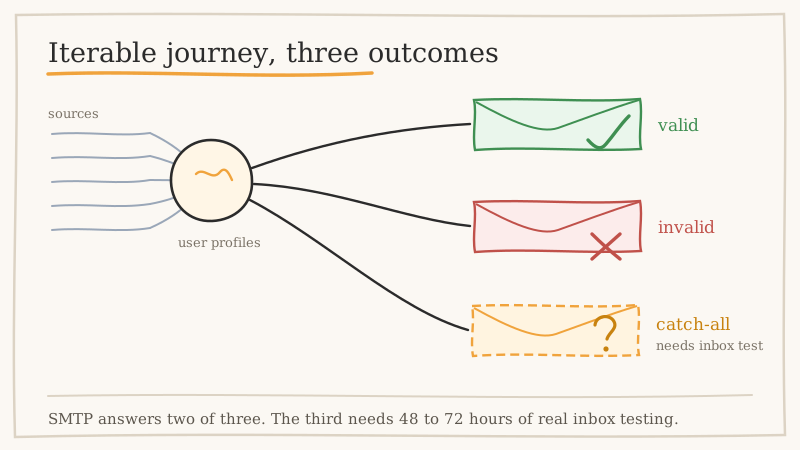
Iterable is not a newsletter tool, and that distinction matters more than most teams realise when bounce rates start climbing. It is a cross-channel engagement platform built around user profiles, events, and journeys. Addresses do not arrive through one tidy double opt-in form. They arrive through Segment, through mParticle, through reverse ETL jobs from your warehouse, through server-side API identify calls, through product signup flows, and through the occasional CSV a growth marketer uploads on a Friday afternoon.
Five ingestion paths means five places where a typo, a scraped list, or a long-dead corporate mailbox can slip into your user base without anyone reviewing it. Then a journey fires, Iterable attempts delivery, and the mailbox providers decide what they think of your sending domain based on data nobody audited.
This guide covers why bounces compound faster in a journey-driven platform than in a broadcast one, how to find the dead weight across your Iterable user profiles, and the specific step most teams skip: resolving the catch-all addresses that standard verification tools leave sitting in limbo.
Why Bounce Rate Behaves Differently in Iterable
In a classic batch ESP you send one campaign, you see one bounce report, and you clean up afterwards. Iterable journeys run continuously. A welcome series triggered by a signup event keeps firing every hour of every day, so a steady trickle of invalid signups produces a steady trickle of bounces against your sending domain with no obvious reporting moment where someone notices.
Three consequences follow from that.
Bad data gets retried across multiple touches. A single invalid address sitting in a five-message onboarding journey can generate several delivery attempts before suppression catches up. One bad record becomes several negative signals.
Reputation damage is gradual, not spiky. There is no single disastrous campaign to point at in a post mortem. Instead, inbox placement erodes over weeks, open rates sag, and the team blames subject lines or send timing while the real problem is list quality.
Profile count drives cost. Iterable, like most enterprise engagement platforms, scales pricing with the size of your addressable user base. Dead records occupy billable slots, inflate your tier, and then damage your deliverability when a journey finally reaches them. You pay to store the problem and you pay again when it detonates.
Add the Gmail and Yahoo bulk sender requirements that landed in 2024 and the margin for error shrank further. Authenticated mail, one-click unsubscribe, and a spam complaint rate held well below 0.3% are now the floor rather than best practice. A list full of unverified addresses works directly against all three, because invalid and abandoned mailboxes are disproportionately likely to sit behind spam traps and recycled domains.
Step One: Audit What Iterable Already Knows
Before you validate anything externally, mine the data you already have. Iterable records delivery outcomes per message and maintains suppression state per channel, which gives you a free first pass at identifying rot.
Pull the following and look at it as one picture rather than separate reports:
- Hard bounces over the last 90 days. These are confirmed dead. Iterable suppresses them, but they still sit in your profile count and they tell you which acquisition source produced them.
- Repeated soft bounces. One soft bounce is a full mailbox or a temporary server issue. Five soft bounces from the same address over two months is an abandoned mailbox that has not been formally decommissioned yet. Treat it as dead. If you want the detail on how to read the difference, our breakdown of soft bounce versus hard bounce covers what each signal actually means about the address behind it.
- Profiles with zero engagement since creation. No open, no click, no site event, nothing. Some of these are privacy-conscious humans. Many are addresses that never existed.
- Spam complaints by source. Segment which ingestion path the complainers came from. If one reverse ETL job or one lead form accounts for a disproportionate share, you have found a pipeline problem rather than a list problem.
Tag the results by source using a custom user field. This is the part teams skip, and it is the part that stops the problem recurring. Knowing that 60% of your hard bounces arrived through a single webinar list import changes what you do next month.
Step Two: Export the Segment You Actually Need to Validate
Do not export your entire user base and run it through a verifier. That is expensive and most of it is unnecessary, because engaged addresses that opened mail last week are demonstrably valid.
Build a segment in Iterable that captures the records where the risk actually lives:
- Profiles created more than 30 days ago with no email open or click in that window
- Profiles with two or more soft bounces and no subsequent engagement
- Profiles imported by CSV or bulk API, regardless of age, that have never engaged
- Profiles on free-mail domains that signed up during any promotional or giveaway campaign
- Any profile where the email field was populated by a data enrichment vendor rather than the user
Export that segment with the email address plus whatever source and created-date fields you tagged in step one. You want the provenance to travel with the address so you can act on patterns afterwards.
Step Three: Run Standard Verification First
Run the export through your usual SMTP-level verification pass. This stage is cheap, fast, and catches the obvious failures: malformed syntax, non-existent domains, missing MX records, known disposable providers, and mailboxes the receiving server will openly confirm do not exist.
You will get back three buckets.
Valid. Re-import or leave in place. These are safe to keep messaging.
Invalid. Remove or suppress immediately. There is no upside to keeping a confirmed dead address in a billable profile slot.
Risky, catch-all, accept-all, or unknown. This is where the workflow usually stalls, and it is the bucket that matters most if you sell B2B.
Step Four: Resolve the Catch-All Bucket
A catch-all domain is configured to accept mail addressed to any local part, whether or not a mailbox exists behind it. Ask the server whether [email protected] is real and it says yes. Ask it about [email protected] and it says yes to that too. The server is not lying. It is just configured to accept everything and sort it out internally, which makes SMTP-level probing structurally incapable of producing an answer.
Standard verification tools return these as “risky”, “accept-all”, or “unknown” because that is genuinely the limit of what SMTP conversation can reveal. Our explainer on how SMTP email verification works and where it fails walks through the mechanics if you want the protocol-level detail.
On a consumer list, catch-all addresses are a small slice. On a B2B list, they are routinely 20% to 40% of the file, because catch-all is a common configuration on Microsoft 365 and Google Workspace business domains. That leaves Iterable teams with two bad options and one good one.
The first bad option is to send to them anyway. Some are real, some are not, and the invalid ones bounce against your domain reputation while your journeys keep retrying across multiple touches.
The second bad option is to delete the whole bucket. That is conservative, safe for deliverability, and quietly throws away a large share of your best-qualified pipeline, because catch-all configurations cluster on exactly the kind of established company domains your sales team wants to reach.
The third option is to resolve them properly. Scrubby exists for this bucket specifically. Rather than relying on an SMTP handshake the receiving server is configured to answer indiscriminately, Scrubby performs inbox-level testing over a 48 to 72 hour window and returns a definitive valid or invalid result, with 98% deliverability on the addresses it clears. In practice that recovers up to 42% more usable leads from a list than discarding the risky segment outright.
The practical workflow for an Iterable team looks like this:
- Export the no-engagement and bulk-imported segment from Iterable
- Run it through your SMTP verifier of choice (ZeroBounce, NeverBounce, MillionVerifier, or similar)
- Isolate the risky, catch-all, accept-all, and unknown rows into their own file
- Upload that file to Scrubby’s deep verification for inbox-level resolution
- Re-import the confirmed valid addresses to Iterable with a
validation_statususer field set, and suppress the confirmed invalid ones
That validation_status field is the piece that pays off repeatedly. Once it exists on the profile, you can gate every journey entry on it, which means a bad address imported next quarter never reaches a send in the first place.
Step Five: Close the Pipeline, Not Just the List
A cleaned list degrades from the day you clean it. Addresses are abandoned, employees change jobs, and domains lapse. Email list decay is continuous, so one-off cleaning is a treadmill unless you fix the intake.
Four changes that hold the gains:
Validate at the point of capture. Call a validation API on form submission and at the API identify boundary, before the profile is written to Iterable. Catching a typo at signup is dramatically cheaper than catching it after six journey messages have already fired at it.
Gate journey entry on validation status. Add the condition to your entry criteria rather than relying on manual segment hygiene. Unvalidated profiles should sit in a holding state until they are resolved, not flow straight into a welcome series.
Validate reverse ETL and warehouse syncs on the way in. Warehouse-sourced addresses feel authoritative because they came from your own systems, but a CRM contact record from 2019 is not a verified mailbox in 2026. Enrichment-sourced addresses deserve particular scrutiny, since their accuracy is the vendor’s claim rather than a confirmed delivery.
Re-validate dormant cohorts on a schedule. Quarterly is reasonable for most teams, monthly if you are sending high volume into B2B domains. If you also keep contact data in a CRM that feeds Iterable, cleaning that upstream system matters just as much, which is what Scrubby’s CRM cleaning is built to handle.
Step Six: Watch the Signals That Predict Trouble
Bounce rate is a lagging indicator. By the time it moves, the damage to your sending reputation has already been recorded. Track the leading signals instead.
Keep hard bounce rate under 2% as an absolute ceiling and treat anything above 1% as a problem to investigate this week rather than this quarter. Watch complaint rate against the 0.3% line that Gmail and Yahoo now enforce, and watch it per journey rather than in aggregate, because one badly targeted re-engagement flow can poison an otherwise healthy account.
Beyond your own metrics, keep an eye on whether your sending domains and IPs have picked up a blacklisting, since that will suppress inbox placement regardless of how clean the specific send was. Scrubby’s blacklist monitor checks domains and IPs against more than 100 blacklists, which turns a slow mystery into a dated event you can respond to.
Finally, confirm your authentication is intact. SPF, DKIM, and DMARC alignment on every sending domain Iterable uses is table stakes under the current bulk sender rules, and a misconfiguration there will undercut the benefit of every cleaning pass you run.
Putting It Together
Iterable gives you real power over journey logic, cross-channel orchestration, and event-driven targeting. None of that compensates for sending to addresses that do not exist. The fix is not complicated, it is just rarely done end to end:
- Audit bounces, soft bounce repeats, and zero-engagement profiles inside Iterable, tagged by ingestion source
- Export only the at-risk segment rather than your whole user base
- Run standard SMTP verification to strip the obvious failures
- Resolve the catch-all and risky bucket at inbox level instead of guessing or deleting
- Write the result back as a user field and gate journey entry on it
- Validate at capture, at API ingest, and on warehouse sync so the problem stops recurring
The catch-all step is the one that separates a list that merely looks clean from one that actually is. If a meaningful share of your Iterable profiles sit on business domains, that bucket is where both your bounce risk and your best leads are hiding. Scrubby offers 200 free validation credits with no credit card required, which is enough to run a sample of your risky segment and see how much of it is real before you commit to cleaning the whole file.

Amit S.
Marketing Lead