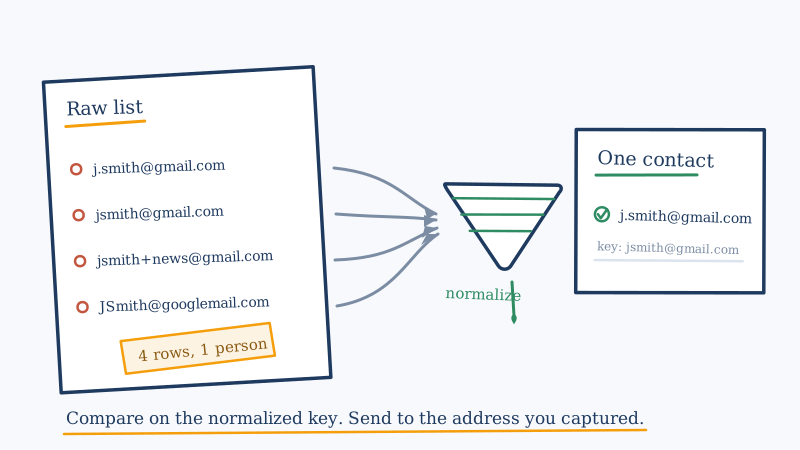
Every email platform claims to deduplicate your list on import. Almost all of them do it the same way: they compare the address strings, character for character, and drop the ones that match. That catches the obvious case where the same address was pasted twice. It catches very little else.
The addresses below are four rows in a typical list. They are also, in all likelihood, one human being:
[email protected]
[email protected]
[email protected]
[email protected]
No exact-match deduplication will touch these. They are four distinct strings. So one person receives four copies of your campaign, you pay to validate four addresses instead of one, and your complaint risk on that contact is multiplied by four. Worse, the engagement signal gets split across the rows, so a contact who actually opens everything can look lukewarm on each individual record.
This is an unglamorous problem, and it is almost never the thing people check when deliverability starts to slide. It is worth checking.
Why exact matching fails
Several independent things make two different strings mean the same mailbox.
The domain is case insensitive. The local part technically is not. Under RFC 5321, the part before the @ is the business of the receiving server, and that server is permitted to treat JSmith and jsmith as separate mailboxes. In practice essentially no major provider does this, but the standard is why you should think of local part lowercasing as a provider specific convention rather than a universal law. More on that distinction below, because it is where people get burned.
Gmail ignores dots in the local part. For a gmail.com address, j.smith, jsmith, and j.s.m.i.t.h all deliver to the same inbox. This rule belongs to Gmail. It is not an email rule.
Plus addressing splits one mailbox into infinite addresses. Also called subaddressing, this is the user+anything@domain pattern. Gmail, Outlook.com, Fastmail, and many self hosted setups support it. Everything after the + is a label the recipient chose, often precisely so they could filter or trace your mail.
Provider owned alias domains. googlemail.com is the same service as gmail.com, a leftover from a trademark dispute in Germany. Mail to either lands in the same place.
Invisible junk from the capture path. Leading and trailing whitespace, non breaking spaces pasted out of a spreadsheet, a trailing comma from a bad CSV split, an address still wrapped in its display name as Jane Smith <[email protected]>, or a mailto: prefix that came along from a scraped page. These are not alias problems, they are hygiene problems, and they create duplicates just as effectively.
The normalization pipeline
The reliable approach is to compute a canonical key for every row, then deduplicate on the key. Order matters, because each step assumes the previous one already ran.
Step one: strip and unwrap. Trim whitespace, including non breaking spaces. Remove any mailto: prefix. If the value looks like Name <address>, extract what is inside the angle brackets. Discard anything with no @ or more than one @, because it is not an address and no amount of normalizing will make it one.
Step two: split on the last @. Not the first. A quoted local part can legally contain an @, and splitting on the first one mangles it.
Step three: lowercase the domain. This is always safe. Domains are case insensitive, full stop.
Step four: resolve known alias domains. Map googlemail.com to gmail.com. If your business has a documented list of its own alias domains, for instance a company that rebranded and kept the old domain live, map those here too. Do not invent entries you have not verified.
Step five: apply provider specific local part rules, keyed on the domain you just resolved. For gmail.com, lowercase the local part and remove all dots. For providers you know support plus addressing, strip everything from the first + to the @. For every other domain, the safe default is to lowercase the local part and leave it otherwise untouched.
Step six: reassemble, and deduplicate on that key. Keep one row per key.
The output for our four rows is a single key, [email protected], and three rows you can collapse.
The rule you must not break
Normalize for comparison. Send to the address you were given.
Store the canonical key in its own field, next to the original. Never overwrite the captured address with its normalized form, and never send to the normalized form.
The reason is that normalization is lossy by design, and some of what it discards is load bearing. Stripping a + tag is the clearest example. If someone subscribed as [email protected], that tag is probably feeding a filter rule that files your mail where they want it. Send to the stripped version and you have quietly broken their setup. On a corporate domain, the + may not be an alias at all, because subaddressing is optional and plenty of servers treat + as an ordinary character in a real mailbox name. Strip it there and the address simply stops existing.
Dots carry the same risk off gmail.com. Removing dots from [email protected] produces [email protected], which may be somebody else entirely, or nobody.
So: the key decides which rows are duplicates. The original decides what you put in the To header. When you collapse a group, keep the row with the best evidence behind it, usually the most recent confirmed signup or the one with real engagement history, and retire the rest rather than deleting them outright so the merge stays auditable.
Where catch-all domains make this genuinely hard
Alias normalization handles the cases where a published rule tells you two strings are equivalent. Google documents the dot behaviour, so you can act on it.
Catch-all domains are the case where no such rule exists. A catch-all domain accepts mail to every address at that domain, whether or not a mailbox is behind it. Point a standard SMTP verification tool at [email protected] and [email protected] on a catch-all domain and both come back the same way, as accept-all or risky, because the server answers yes to everything. The tool is not failing. It is reporting accurately that the SMTP conversation cannot distinguish these.
That leaves you unable to tell whether you are looking at one person with two spellings, two different employees, or one real mailbox plus one address that quietly discards everything sent to it. Guessing has a cost either way: collapse them wrongly and you drop a real contact, keep them both and you may be mailing an address with no human behind it.
This is the specific gap Scrubby exists to close. Rather than relying on the SMTP handshake, it performs inbox level validation on exactly the risky and catch-all segment that other tools cannot resolve, returning a definitive valid or invalid result instead of leaving the address in the grey area. The deep verification path works over a 48 to 72 hour window, which is what the deeper testing requires. The practical sequence is to normalize first, so you are not paying to test four variants of one mailbox, then send the surviving catch-all rows for validation to find out which of them are real.
Deduplicate the CRM, not just the export
A detail that undoes a lot of this work: people clean the file they are about to upload, send the campaign, and leave the source system untouched. The duplicates are still in the CRM, so the next export regenerates them, and any rep looking at the account still sees four contacts.
Deduplicate at the source. If your contact data lives in a CRM, the normalized key belongs in a field on the record there, and the merge should happen there. Scrubby’s CRM cleaning is built for that side of the job, and its integrations cover the usual suspects including HubSpot, Salesforce, Pipedrive, and Clay, so results can flow back to the records rather than dying in a spreadsheet on someone’s desktop.
While you are in there, check the capture path that produced the duplicates. Most alias sprawl comes from a form with no validation at the point of entry, letting the same person sign up repeatedly across months with whatever spelling they typed that day. Fixing the form stops the bleeding. Deduplication only cleans up after it.
A working order of operations
- Strip, unwrap, and discard structurally invalid rows.
- Compute the canonical key using the pipeline above, and store it in its own field.
- Group by key and merge, keeping the original address and the strongest engagement history.
- Record which rows were merged into which, so the decision is reversible.
- Run the remaining list through standard verification, then route the risky and catch-all segment to inbox level validation.
- Push merges and results back to the source system, not just the export.
- Add validation at the point of capture so the problem does not rebuild itself.
The short version
Exact-match deduplication is not deduplication. It is string comparison, and your contacts do not type their address the same way twice. A canonical key built from a few well understood provider rules will find duplicates your platform reports as unique, and it costs you nothing but the care to apply the rules only where they actually hold.
Keep the original. Compare on the key. And when the key cannot settle it, which is exactly what happens on catch-all domains, use a validation method that looks past the SMTP handshake instead of guessing.

Kristel K.
Content Strategist