Open any email platform dashboard and you will see a delivery rate somewhere north of 98%. It feels like good news. It is not news at all.
“Delivered” in an ESP report means one thing: the receiving server accepted the message and did not return a bounce. That is the entire claim. It says nothing about which folder the message went into, whether a filter quietly binned it, or whether a human being ever laid eyes on the subject line. A message that gets accepted by Gmail and routed straight to spam counts as delivered. So does one that lands in Promotions and gets swept out with the weekly purge.
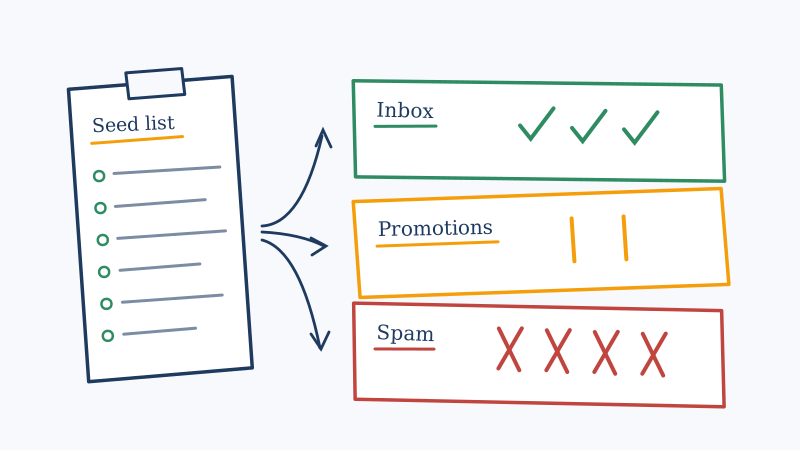
The gap between “accepted” and “seen” is where most deliverability problems live, and the only reliable way to measure it is to send to inboxes you control and go look. That is a seed list.
What a seed list actually is
A seed list is a set of email addresses you own, spread across the mailbox providers your real audience uses, that you include in a send so you can watch the message arrive. You check each mailbox manually (or via a tool) and record the folder it landed in.
The output is not a percentage from a vendor. It is direct observation: this message reached Gmail’s Primary tab, got filed under Promotions at Yahoo, and hit the junk folder at Outlook. That is actionable in a way “99.2% delivered” never will be.
Seed lists answer questions your ESP cannot:
- Is this campaign reaching the Primary tab or the Promotions tab?
- Does one specific provider treat us worse than the others?
- Did the subject line change we shipped on Tuesday move us into spam?
- Is our new sending domain trusted yet, or is it still on probation?
Building the list: the part people get wrong
A badly built seed list is worse than no seed list, because it produces numbers that look like data and are actually noise. Three failure modes cause almost all of it.
Failure one: the mailboxes are dead. You create twelve Gmail accounts, never log in again, and run tests against them for a year. Gmail notices. A mailbox with zero engagement history behaves nothing like a real subscriber’s mailbox, and the filtering decisions it produces do not transfer. Your seed accounts need to look lived-in.
Failure two: the provider mix does not match your audience. If 60% of your list is on Google Workspace and your seed list is mostly consumer Gmail and Yahoo, you are measuring the wrong filters. Business mail flows through different infrastructure with different rules.
Failure three: the seed addresses sit inside the main campaign segment. Seeds that get counted in your open and click metrics distort every number you report, and seeds that receive the campaign through a different automation path than real subscribers are not testing the real send.
Here is how to build it properly.
Step 1: mirror your actual provider distribution
Pull your list and count the domains. You will usually find that five or six providers cover 80% of your audience. Build the seed list in roughly those proportions:
| Provider | Why it belongs | What to create |
|---|---|---|
| Gmail (consumer) | Largest consumer filter, tab routing | 4 to 6 accounts |
| Google Workspace | Different ruleset from consumer Gmail | 2 to 3 on a real domain |
| Outlook.com / Hotmail | Microsoft consumer filtering | 3 to 4 accounts |
| Microsoft 365 | Where B2B mail actually lands | 2 to 3 on a real tenant |
| Yahoo / AOL | Shared filtering stack, strict on complaints | 2 to 3 accounts |
| Apple iCloud | Growing share, quiet filtering | 1 to 2 accounts |
| Regional providers | GMX, Mail.ru, Naver, QQ if relevant | as your data demands |
Twenty to thirty mailboxes is plenty for most senders. The temptation is to go bigger. Resist it. You have to check every one of these by hand or keep tooling pointed at them, and a list of twenty you actually read beats a list of two hundred you never open.
Step 2: make the mailboxes look alive
This is the step that separates a useful seed list from a decorative one. For each seed account:
- Subscribe to five or ten legitimate newsletters you have no stake in, so there is normal inbound traffic.
- Log in periodically. Open things. Reply to something. Archive rather than delete.
- Never mark your own campaign as spam, and never mark it as not-spam either, since both actions teach the filter and corrupt the next test.
- Give the accounts real-looking names.
test1@,test2@,seed3@is a pattern, and patterns are detectable.
A seed mailbox should be indistinguishable from a mildly engaged subscriber. That is the whole point.
Step 3: keep seeds out of your reporting
Send to seeds in a way that mirrors the real send path but does not pollute metrics. Depending on your platform that means a parallel segment triggered by the same automation, a separate suppression tag that excludes seeds from analytics, or a dedicated list that receives the identical creative at the same time.
What you must not do is paste the seed addresses into the main recipient list and then subtract them later in a spreadsheet. The open-rate contamination is small, but the engagement signal you are feeding back to the providers is not.
Step 4: validate the seed list itself, then leave it alone
Seed mailboxes expire. Providers reclaim inactive consumer accounts, domains lapse, and a tenant you set up eighteen months ago gets deprovisioned. When a seed address dies silently, you stop receiving results from it and quietly conclude that provider is fine.
Run the seed list through validation on a schedule (quarterly is reasonable) and replace anything that comes back dead. If any of your seeds live on a domain with a catch-all configuration, which is common for the business-domain seeds in step 1, standard verification will return “accept-all” rather than a verdict, and you will not know whether the mailbox still exists. Scrubby’s deep verification resolves exactly that case, running inbox-level testing over a 72 hour window to return a definitive valid or invalid result instead of a shrug.
Reading the results without fooling yourself
Once the send goes out, record for every seed: which folder, how long it took to arrive, and anything unusual in the headers. A simple grid works fine.
The patterns worth acting on:
Spam at one provider, inbox everywhere else. This is a reputation problem specific to that provider, not a content problem. Microsoft and Google score you independently. Check your complaint rate and your sending history with that provider before you touch the copy.
Promotions tab at Gmail, inbox at everyone else. Almost always content and structure: heavy templates, many links, image-dominant layouts, marketing-register language. Gmail is classifying correctly; whether that is a problem depends on whether your audience reads the Promotions tab.
Spam everywhere, suddenly. Look at what changed in the last 48 hours. New sending IP, new domain, authentication break, a spike in volume, or a list segment that bounced hard. This is the signature of a reputation event, not of a bad subject line.
Slow delivery, arriving an hour late, then landing in inbox. You are being greylisted or throttled. The provider is deferring your mail while it decides about you. It usually resolves, but it means you are on thin ice.
Inbox everywhere on seeds, poor performance in reality. The most confusing result, and the most common. Your seeds are clean mailboxes you control. Your real list is not. If placement looks perfect and engagement is terrible, the problem is list quality: dead addresses, spam traps, and role accounts dragging the aggregate reputation down. Seed testing is blind to this by design, which is why it is one instrument and not the whole dashboard.
What seed lists cannot tell you
A seed list measures placement for the mailboxes in it. That is all. It does not measure:
- The health of your actual list. Twenty seeds cannot reveal that 14% of your real recipients no longer exist.
- Per-recipient outcomes. Filtering is partly personalised. Two subscribers at the same provider can get different folders.
- Blacklist status. You can sit on a public blacklist and still reach your seeds, particularly if those providers do not consult that list. Monitoring your domains and IPs against blacklists directly, which is one of the tools on Scrubby’s product lineup, covers a blind spot seeds leave wide open.
Seed testing is a thermometer. It tells you that you have a fever. It does not tell you why, and it cannot tell you about the parts of your body it is not touching.
Running the loop properly
The sequence that produces useful deliverability work, rather than deliverability anxiety:
- Establish a baseline. Run three sends to the seed list before changing anything. One test is an anecdote.
- Change one variable. New subject line, or new template, or new sending domain. Not all three.
- Re-test and compare. Same seed list, same time of day, same day of week where you can manage it.
- Check the list underneath. If placement is good and results are bad, stop tuning copy and go clean the list. A validated list is the floor that every other deliverability fix stands on, and Scrubby was built to resolve the risky and catch-all segment that standard verifiers leave as a grey area. See scrubby.io for how the inbox-level approach differs from SMTP-only checks.
- Re-seed quarterly. Retire dead mailboxes, add providers as your audience shifts, and keep the accounts engaged.
The honest summary
Your ESP’s delivery rate is a measure of acceptance, not of arrival. A seed list closes that gap by letting you watch your own mail land, and it is the cheapest deliverability diagnostic available. Build it to mirror your real audience, keep the mailboxes genuinely active, keep the seeds out of your reporting, and validate the seed addresses themselves so a dead mailbox never masquerades as a passing test.
Then remember what the instrument is for. Seeds tell you how the mailbox providers feel about your sending. They cannot tell you how much of your list is fiction. Pair placement testing with a list you have actually verified, and you are measuring both halves of the problem instead of guessing at one and ignoring the other.

Nick Abraham
Cold Email Expert