Every deliverability checklist on the internet tells you to set up SPF, DKIM, and DMARC. Those three live in your DNS zone as TXT records, you control that zone, and you can fix all three in an afternoon with a registrar login and some patience.
Reverse DNS gets a single bullet point on those same checklists, usually phrased as “make sure your PTR record is set.” Then the checklist moves on, because the honest version of that bullet is uncomfortable: the record does not live in your zone, you probably cannot edit it, and the person who can is whoever owns the IP address.
That gap is why reverse DNS is the most commonly broken piece of sender configuration we see. Not broken in the sense of obviously absent, which would at least be easy to spot. Broken in the quieter ways: a PTR that resolves to a provider default like ec2-198-51-100-24.compute-1.amazonaws.com, a PTR that points at a hostname which does not resolve back, or a PTR that disagrees with the HELO name your mail server actually announces.
Receiving servers notice all three. This guide covers what they check, who can change it, how to verify it in thirty seconds, and the one deliverability problem a perfect PTR record will never solve.
Forward DNS, Reverse DNS, and Why Both Directions Matter
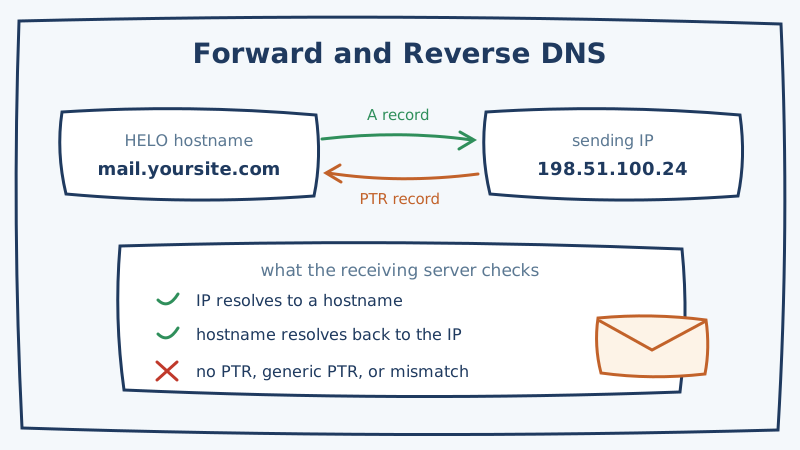
Forward DNS is the direction you already understand. You ask for a hostname and you get back an IP address. That is the A record (or AAAA for IPv6) that makes mail.yoursite.com resolve to 198.51.100.24.
Reverse DNS runs the other way. You hand over an IP address and ask what hostname it claims to be. That answer comes from a PTR record, and PTR records do not sit in yoursite.com. They sit in a special reverse zone derived from the IP itself, written backwards under in-addr.arpa. The PTR for 198.51.100.24 lives at 24.100.51.198.in-addr.arpa.
Because the reverse zone is derived from the IP block, it is delegated to whoever was allocated that block. That is your cloud provider, your VPS host, your colocation facility, or your email service provider. It is not your domain registrar, no matter how many support articles imply otherwise. This single fact explains almost every confused support ticket about PTR records.
Receiving mail servers do not just look at the PTR in isolation. The check they actually run is forward-confirmed reverse DNS, usually abbreviated FCrDNS:
- Take the IP that opened the SMTP connection.
- Look up its PTR record to get a hostname.
- Look up the A record for that hostname.
- Confirm the A record points back to the original IP.
If any step fails, the check fails. A PTR that points to a hostname with no A record is as bad as no PTR at all, arguably worse, because it looks like a misconfiguration someone attempted rather than a default nobody touched.
What Receivers Actually Do With a Failed Check
Nobody publishes a scoring table, so be skeptical of any guide that gives you an exact penalty. What is documented, and what is observable in practice, breaks down roughly like this.
Outright rejection is real but narrowly applied. Some receivers, particularly self-hosted Postfix and Exim setups with reject_unknown_client_hostname turned on, will refuse the connection with a 450 or 550 and a message mentioning “cannot find your hostname” or “reverse DNS lookup failed.” You will see these as bounces with clear text in them, which makes this the easiest failure mode to diagnose. Our guide to SMTP bounce codes covers how to read those responses.
The large mailbox providers treat it as a reputation input. Google’s bulk sender guidance explicitly asks that your sending IP have a valid reverse DNS record pointing to your domain. Microsoft’s guidance for Outlook and Microsoft 365 says the same. Neither of them documents a hard reject for a missing PTR, and in practice mail without one does get delivered. It just carries a worse starting position, and a worse starting position compounds with every other weak signal on the same connection.
Spam filters weight it as a legitimacy proxy. Rules-based filters like SpamAssassin have long carried checks for a missing or dynamic-looking PTR. The scores are small individually. They matter when they stack on top of other small penalties, which is exactly the situation a sender with a thin reputation is already in.
The reasonable mental model: reverse DNS is not what gets you into the inbox. It is a basic credential, and failing to present it tells the receiver that whoever set up this sending infrastructure did not finish the job.
Check Your Current State in Thirty Seconds
Before changing anything, find out what you actually have. Start with the IP your mail leaves from, which is not necessarily the IP your website runs on.
On macOS or Linux, ask for the PTR directly:
dig -x 198.51.100.24 +shortThen confirm the forward direction with whatever hostname came back:
dig mail.yoursite.com +shortThe two outputs need to agree. On Windows, nslookup 198.51.100.24 does the reverse lookup. If you would rather not touch a terminal, MXToolbox and similar tools run both halves and show you the result.
Reading the output, you are sorting yourself into one of five buckets:
- No answer at all. No PTR exists. Worst case, and common on fresh VPS instances and bare metal.
- A provider default. Anything containing the IP as digits plus a cloud provider domain, like
ec2-198-51-100-24.compute-1.amazonaws.comorstatic.198.51.100.24.clients.your-server.de. Technically valid, and it announces “generic cloud IP” to every receiver. - A hostname that does not resolve back. Someone set the PTR and never created the matching A record, or the A record moved. FCrDNS fails.
- A hostname on the wrong domain. The PTR resolves cleanly but points to a hostname unrelated to the domain you send from. Not fatal, and not the aligned signal you want.
- A correct, matching, domain-branded hostname. Done. Move on to list quality.
While you are in the terminal, check what your server announces as its HELO or EHLO name. Microsoft SNDS reports a sample HELO string, which makes it one of the easier places to spot a mismatch. If you are not already reading that data, our Microsoft SNDS setup guide walks through getting access.
Setting the Record, Platform by Platform
The pattern is the same everywhere: create a forward A record first, then ask the IP owner to point the PTR at it. Doing it in that order means the FCrDNS check passes the moment the PTR propagates, instead of failing for however long it takes you to notice.
Step one, always. In your own DNS zone, create an A record such as mail.yoursite.com pointing to the sending IP. Use a hostname that reflects the sending domain. Keep it boring and readable, because humans at receiving organizations do occasionally look at it.
Amazon EC2 and Amazon SES with a dedicated IP. For EC2, reverse DNS on an Elastic IP is set through the Elastic IP console, which also lifts the default outbound port 25 throttle in the same request flow. For SES with dedicated IPs, AWS manages the PTR for you on the dedicated IP pool. Note that SES account-level sending pauses triggered by bounce rates are a separate problem entirely, which we cover in how to reduce Amazon SES bounce rates.
Google Cloud Platform. Reverse DNS is configured on the external IP of the VM instance through the Cloud Console or gcloud. Google Cloud also blocks outbound port 25 on most accounts, so most senders on GCP end up relaying through a provider anyway, in which case the relay’s PTR is what receivers see.
Microsoft Azure. Set the reverse DNS property on the public IP resource. Azure additionally requires that the forward A record already exist and match before it will accept the PTR value, which conveniently enforces the correct order of operations.
DigitalOcean, Linode, Vultr, Hetzner, OVH. These set the PTR from the droplet or instance name, or from a dedicated rDNS field in the control panel. DigitalOcean in particular derives it from the droplet name, so renaming the droplet to mail.yoursite.com is the actual fix and it surprises people every time.
SendGrid, Mailgun, Postmark, SparkPost on dedicated IPs. The provider owns the reverse zone and sets the PTR to a hostname on their domain, or on a subdomain you delegate to them during dedicated IP setup. Follow their white-label or branded-sending flow rather than trying to set it yourself.
Any shared IP pool. You cannot set the PTR, you should not try, and that is genuinely fine. The provider’s PTR is correct and consistent for the whole pool. Your reputation on shared infrastructure is driven by your list quality and complaint rate, not by a record you have no access to.
Google Workspace and Microsoft 365 as your sender. Nothing to do. Google and Microsoft own the outbound IPs and their PTR records are already correct. If you are sending through Workspace or 365 and someone tells you to fix your PTR, they have misdiagnosed the problem.
Three Failure Modes That Look Like Success
The PTR is set but the A record is missing. The most common half-finished configuration. dig -x returns a beautiful hostname, that hostname resolves to nothing, and FCrDNS fails. Always verify both directions, never just the reverse one.
Multiple PTR records on one IP. The DNS specification permits it. Mail servers handle it inconsistently, and some stop at the first answer they get, which may not be the one you intended. Keep exactly one PTR per IP.
HELO name disagrees with the PTR. Your PTR says mail.yoursite.com and your mail server announces localhost.localdomain or the raw hostname of the box. Receivers compare these. Fix it in your MTA configuration: myhostname in Postfix, primary_hostname in Exim. This one is invisible unless you specifically look for it, which is why the SNDS sample HELO field is worth checking.
A fourth situation is worth naming because it is not actually a failure. If your IP sits behind a mail gateway, a security product, or a relay, the IP that receivers see is the gateway’s, not yours. Check the PTR on the IP that appears in the Received headers of a message you actually sent, not the one you think you are sending from.
The Part Reverse DNS Cannot Fix
Here is where a lot of deliverability work goes sideways. A sender sees poor inbox placement, audits their authentication stack, finds a missing PTR, fixes it, and waits for the numbers to move. Sometimes they do. Often they barely budge, and the reason is that authentication and list quality are different problems with different symptoms that happen to produce similar graphs.
Reverse DNS tells a receiver that your sending infrastructure is legitimately configured. It says nothing at all about whether the addresses you are sending to exist. You can hold a perfect PTR record, aligned SPF, DKIM signing on every message, a DMARC policy at reject, and still get throttled into oblivion because a meaningful share of your recipients bounce.
That second problem is the one most senders underestimate, because the standard tools only solve part of it. Run a list through any SMTP verification service and you get three buckets back: valid, invalid, and a grey area labelled risky, catch-all, or accept-all. The grey bucket exists because catch-all domains accept mail for every address at the domain during the SMTP handshake, so a handshake-level probe cannot distinguish a real mailbox from one that was never created. On B2B lists that bucket routinely runs 20 to 40 percent of the file.
Senders then pick one of two bad options. Delete the whole segment and throw away real, reachable contacts. Or send to it and discover which addresses were fake by watching your bounce rate climb past the thresholds that trigger throttling and account reviews.
Scrubby exists for exactly that bucket. It validates the catch-all and risky addresses that standard SMTP verification cannot resolve, using deep inbox-level testing over a 48 to 72 hour window to return a definitive valid or invalid result rather than a shrug. The approach delivers 98 percent deliverability and recovers up to 42 percent more usable leads from lists that would otherwise be pruned on guesswork. The practical workflow is to keep your existing verifier for the easy cases, export the risky segment, and push just that segment through Deep Verification for a real answer.
Scrubby also runs a Blacklist Monitor that watches your domains and IPs against more than 100 blacklists, which pairs naturally with the kind of infrastructure audit this article describes. A PTR record you fixed last month does not help much if the IP behind it got listed last week and nobody noticed.
If the catch-all problem is new to you, the ultimate guide to catch-all emails is the longer treatment. There are 200 free validation credits available if you would rather test the result on your own risky segment than take the number on faith.
A Working Order of Operations
Reverse DNS is a thirty minute task that most senders never complete, and the completed version looks like this:
- Identify the real sending IP from the Received headers of a message you actually sent.
- Create an A record on a sending subdomain pointing to that IP.
- Ask the IP owner, which is your cloud provider or ESP and not your registrar, to set the PTR to that hostname.
- Confirm both directions resolve and agree.
- Align your MTA’s HELO name with the same hostname.
- Confirm that one and only one PTR exists for the IP.
Then stop working on authentication and go look at your list, because that is where the remaining deliverability upside almost certainly lives. A sender with clean infrastructure and a dirty list still lands in spam. A sender with clean infrastructure and a verified list is simply a sender that receivers have no reason to filter.

Amit S.
Marketing Lead